Question 7
For each of the following statements, select Yes if the statement is true. Otherwise, select No. NOTE: Each correct selection is worth one point.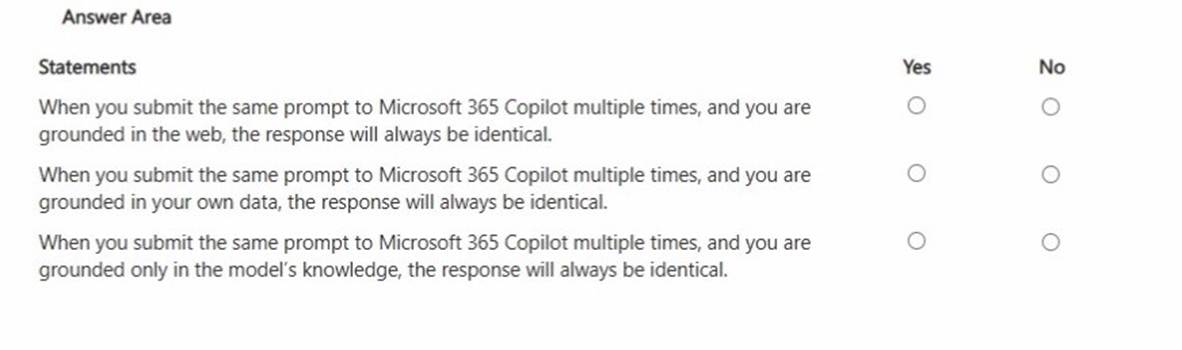
Solution:
All three statements arefalsebecause generative AI responses are not guaranteed to be identical even when the prompt is the same. First, when grounded in theweb, results can vary due to changing web content, different retrieved sources, or differences in how information is summarized at run time. Second, when grounded inyour organization's data, responses can change based on updates to files, emails, meetings, permissions, or which specific items Copilot retrieves as the most relevant context at that moment. Third, even when relying only on the model's general knowledge, large language models are probabilistic: they may choose different wording, structure, examples, or emphasis across runs, especially when temperature/decoding settings and internal routing differ. In business scenarios, this means Copilot outputs should be treated as drafts that may require validation, and repeatability should be improved by adding precise constraints (cite specific sources, use fixed formats, specify exact sections, and request verbatim quotes where appropriate).
Does this meet the goal?
Correct Answer:A
Question 8
You have a Microsoft Excel workbook open that contains a table. The table contains sales data and the following columns:
- OrderDate
- OrderNumber
- Amount
You plan to use Microsoft Copilot in Excel to generate a monthly summary of the sales data in the table.
What should you include in the prompt to generate an effective summary? More than one answer choice may achieve the goal. Select the BEST answer.
Correct Answer:AD
To generate an effective monthly sales summary using Microsoft Copilot in Excel, your prompt must include a clear goal that specifies exactly what you want to achieve.
Why the Goal Matters
A clear goal is the most critical part of a prompt. Without it, Copilot may provide generic insights that don't align with your business needs.
Elements of an Effective Prompt
While a goal is the only required element, adding these components can significantly improve results:
Goal: What you specifically want Copilot to do (e.g., "Summarize monthly sales").
Context: Why you need it or who the audience is (e.g., "for a leadership briefing").
Expectations: How you want the output to look (e.g., "in a bulleted list" or "as a PivotTable").
Source: Which specific data to use (e.g., "from the 'SalesTable'").
Example of an Effective Prompt
Instead of saying "Summarize this data," use a structured prompt like this:
"Summarize the monthly revenue from the 'SalesTable' [Goal/Source]. Identify the top-performing product category and any significant sales trends [Context]. Present the findings in a concise bulleted list for my manager [Expectations]."
Reference:
https://stringfestanalytics.com/how-to-write-effective-prompts-for-copilot-in-excel/
Question 9
You are using Microsoft 365 Copilot to enhance your productivity in Microsoft Teams.
Which two tasks can you achieve by using Copilot in Teams? Each correct answer presents a complete the solution.
NOTE: Each correct selection is worth one point.
Correct Answer:CD
Question 10
Select the answer that correctly completes the sentence.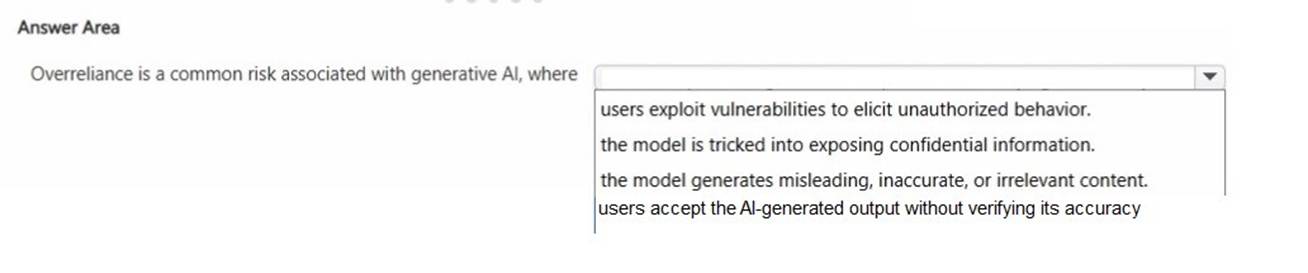
Solution: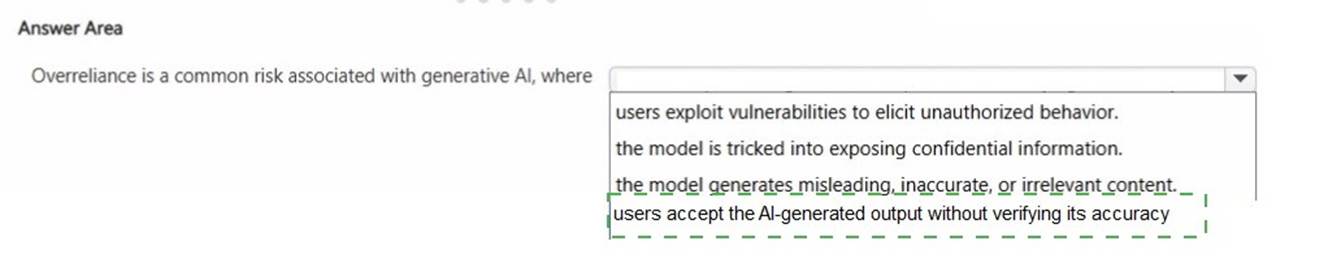
Does this meet the goal?
Correct Answer:A
Question 11
You create a Microsoft 365 Copilot notebook and add a file named Process.docx from a local folder. Yesterday, you updated Process.docx in the local folder. What will occur when you chat in the notebook? A. The chat will reference both versions of Process.docx.B. The chat will reference the most recent version of Process.docx.C. The chat will reference only the original version of Process.docx.
Correct Answer:C
Microsoft 365 Copilot notebooks use the version of a file that was uploaded or attached at the time it was added to the notebook. When a document such as Process.docx is added from a local folder, Copilot references that uploaded snapshot of the file. If the file is later modified locally, the notebook does not automatically sync or refresh with the updated local version unless the updated file is re-uploaded.
Microsoft guidance on grounding and file references explains that Copilot works with the specific content stored in Microsoft 365 or the attached artifact within the notebook session. Since the updated version remains in the local folder and was not reattached, Copilot continues to use the originally added version.
Therefore, during subsequent chats in the notebook, Copilot references only the original uploaded version of Process.docx.
==================================================
Question 12
HOTSPOT - Select the answer that correctly completes the sentence.
Solution:
Does this meet the goal?
Correct Answer:A