Question 7
A Linux administrator tries to install Ansible in a Linux environment. One of the steps is to change the owner and the group of the directory /opt/Ansible and its contents. Which of the following commands will accomplish this task?
Correct Answer:B
Comprehensive and Detailed Explanation From Exact Extract:
The chown command is used to change the owner and group of files and directories. The -R (recursive) flag ensures that all contents within the directory are also updated. The correct syntax is chown -R owner:group directory. So, chown -R Ansible:Ansible /opt/Ansible will change the owner and group for /opt/Ansible and everything inside it to "Ansible".
Other options:
* A.groupmod is used to modify group properties, not ownership of directories or files.
* C.usermod is for modifying user properties or group memberships.
* D.chmod changes permissions, not owner/group.
[Reference:, CompTIA Linux+ Study Guide: Exam XK0-006, Sybex, Chapter 6: "User and Group Management", Section: "Managing File Ownership and Permissions", CompTIA Linux+ XK0-006 Objectives, Domain 1.0: System Management, ]
Question 8
Which of the following best describes a use case for playbooks in a Linux system?
Correct Answer:A
In the context of Linux automation and orchestration,playbooksare most commonly associated with configuration management tools such asAnsible, which is explicitly referenced in the CompTIA Linux+ V8 objectives. Playbooks are written in YAML and are designed to definea series of tasks, configurations, and desired system statesthat should be applied to one or more Linux systems in a repeatable and automated manner.
A primary use case for playbooks isapplication deployment and system configuration automation. Playbooks allow administrators to specify tasks such as installing packages, configuring services, managing users, setting permissions, deploying application files, and starting or enabling services. This aligns directly with optionA, which accurately describes playbooks as a method to provide a set of tasks and configurations required to deploy an application consistently across environments.
The remaining options are not accurate representations of playbook functionality. OptionBrefers to version control implementation, which is handled by tools like Git and is not the purpose of playbooks themselves, although playbooks may be stored in version control systems. OptionCdescribes container security information, which is typically managed through container runtime configurations, secrets, or security policies rather than playbooks. OptionDrefers to storage volume information for a pod, which is specific to Kubernetes manifests and not a general Linux playbook use case.
According to Linux+ V8 documentation, automation tools and playbooks help reduce human error, improve consistency, and support Infrastructure as Code (IaC) practices. Playbooks are a key mechanism for orchestrating multi-step operations across multiple systems, making them essential for modern Linux system administration.
Therefore, the correct answer isA, as it best describes the practical and documented use case for playbooks in a Linux system.
Question 9
A systems administrator attempts to edit a file as root, but receives the following error: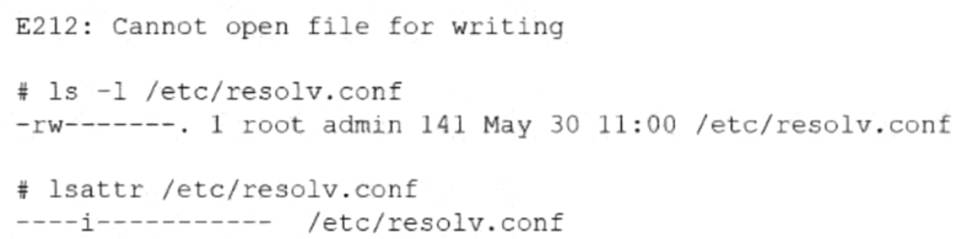
Which of the following commands allows the administrator to edit the file?
Correct Answer:B
This scenario involves Linux file attributes and falls under theSystem Managementdomain of the CompTIA Linux+ V8 objectives. Although the administrator is operating as the root user, the system prevents the file from being modified. This behavior indicates that standard UNIX permissions are not the root cause of the problem.
The critical clue is provided by the lsattr /etc/resolv.conf output, which shows theimmutable (i) attributeset on the file. When a file is marked immutable, it cannot be modified, deleted, renamed, or written to by any user, including root. This restriction overrides normal file permissions and ownership settings.
The chattr command is used to modify extended file attributes on Linux filesystems such as ext4. The option -i specifically removes the immutable attribute, restoring the file??s ability to be edited. Therefore, running chattr -i /etc/resolv.conf allows the administrator to open and modify the file successfully.
The other options do not resolve the issue. chown root changes file ownership, but the file is already owned by root. chmod 750 modifies permission bits, but permissions are ignored when the immutable attribute is set. chgrp root changes the group ownership, which also has no effect when immutability is enforced.
Linux+ V8 documentation highlights immutable files as a security and stability feature, commonly used to protect critical configuration files from accidental or unauthorized changes. Administrators must explicitly remove this attribute before making modifications.
Therefore, the correct command to allow editing the file isB. chattr -i /etc/resolv.conf.
Question 10
A systems administrator is preparing a Linux system for application setup. The administrator needs to create an environment variable with a persistent value in one of the user accounts. Which of the following commands should the administrator use for this task?
Correct Answer:D
Environment variables are widely used in Linux systems to configure application behavior, and Linux+ V8 emphasizes the distinction between temporary and persistent variables. A variable is persistent only if it is defined in a shell initialization file.
The correct approach is echo "export VAR=value" >> ~/.bashrc. This command appends the variable definition to the user??s .bashrc file, ensuring the variable is set automatically every time the user starts a new shell session. This makes the variable persistent for that specific user.
Options B and C only define variables in the current shell session and are lost when the session ends. Option A incorrectly targets the SSH configuration directory and is not appropriate for defining shell environment variables.
Linux+ V8 documentation highlights .bashrc, .bash_profile, and /etc/profile as correct locations for persistent environment variables. Therefore, the correct answer is D.
Question 11
An administrator must secure an account for a user who is going on extended leave. Which of the following steps should the administrator take?(Choose two)
Correct Answer:DF
Comprehensive and Detailed 250 to 350 words of Explanation From Linux+ V8 documents:
Securing dormant or temporarily unused user accounts is a best practice emphasized in theSecuritydomain of CompTIA Linux+ V8. When a user goes on extended leave, the goal is toprevent unauthorized accesswhile preserving the user??s data and account for future use.
The most effective approach is todisable authentication and interactive login accesswithout deleting the account. OptionD, running passwd -l user, locks the user??s password by prepending an invalid character to the encrypted password in /etc/shadow. This prevents password-based authentication while retaining the account, files, and ownership information. Linux+ V8 documentation highlights password locking as a standard method for temporarily disabling accounts.
OptionF, changing the user??s shell to /sbin/nologin, further strengthens account security by preventing interactive shell access entirely. Even if another authentication mechanism were attempted, the user would be denied a login shell. This is a common defense-in-depth measure and is explicitly referenced in Linux+ V8 objectives for access control and account hardening.
The other options are incorrect or inappropriate. OptionA(immutable files) does not prevent account access and may interfere with system operations. OptionBdefeats the purpose of securing an inactive account. OptionCdeletes user data, which is unnecessary and risky. OptionEhas no security effect, as filesystem timestamps do not control access.
Linux+ V8 stresses that secure account management should bereversible, auditable, and minimally disruptive. Locking the password and disabling the login shell meet these criteria and are commonly used together in enterprise environments.
Question 12
An administrator needs to remove the directory /home/user1/data and all of its contents. Which of the following commands should the administrator use?
Correct Answer:C
File and directory management is a core system administration skill addressed in Linux+ V8. When an administrator needs to delete a directory that contains files or subdirectories, a recursive deletion is required.
The correct command is rm -r /home/user1/data. The rm command removes files, and the -r (recursive) option allows it to delete directories and all of their contents, including nested files and subdirectories. This is the standard and correct method for removing non-empty directories.
The other options are incorrect. rmdir -p only removes empty directories and will fail if the directory contains files. ln -d is used to create directory hard links, not remove directories. cut -d is a text-processing command unrelated to filesystem operations.
Linux+ V8 documentation stresses caution when using rm -r, as it permanently deletes data without recovery unless backups exist. Therefore, the correct answer is C.