Question 7
In firmware version 7.6, how does on-premises FortiAnalyzer store logs? (Choose one answer)
Correct Answer:A
Comprehensive and Detailed Explanation From Exact Extract of knowledge of FortiAnalyzer 7.6 Study guide documents:
FortiAnalyzer 7.6 stores on-premises logs in aClickHouse SQL database(not MySQL, Postgres, or Elasticsearch). Fortinet??s FortiAnalyzer 7.6 SQL Query documentation explicitly states that log data is inserted into the SQL database and that "FortiAnalyzer uses a ClickHouse SQL database."
This is consistent with how the study guide describes the storage/analytics pipeline in 7.6: it explains that FortiAnalyzer indexes incoming raw logs (insert rate)"by the SQL database and the sqlplugind daemon." This "SQL database" in 7.6 corresponds to the ClickHouse-backed log database described in the Fortinet documentation.
Question 8
You created a playbook on FortiAnalyzer that uses a FortiOS connector. When you configure FortiGate, which type of trigger must you use so that the actions in an automation stitch are available in the FortiOS connector? (Choose one answer))
Correct Answer:B
From Exact Extract of knowledge of FortiAnalyzer 7.6 Study guide documents:
The study guide explains that FortiAnalyzer playbook tasks rely on connectors, and that the FortiOS connector will not show its available actions until FortiGate is configured with the correct automation trigger. The guide states:"For example, the FortiOS connector will be listed as soon as the first FortiGate device is added to FortiAnalyzer. However, to see the actions related to that FortiOS connector, you must enable an automation rule using the Incoming Webhook Call trigger on FortiGate."
This is why the required FortiGate trigger type isIncoming webhook(option B): it is the specific trigger FortiOS must use so FortiAnalyzer can expose and use the FortiOS connector actions within the playbook workflow.
Question 9
Exhibit.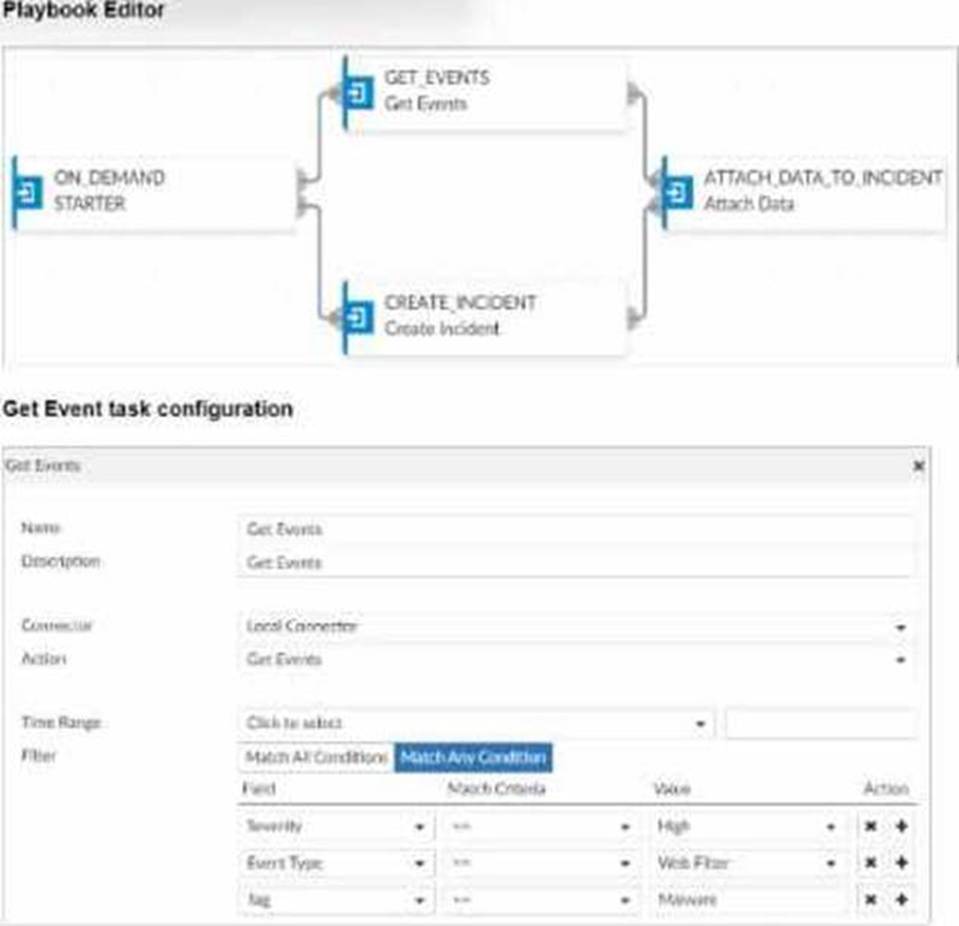
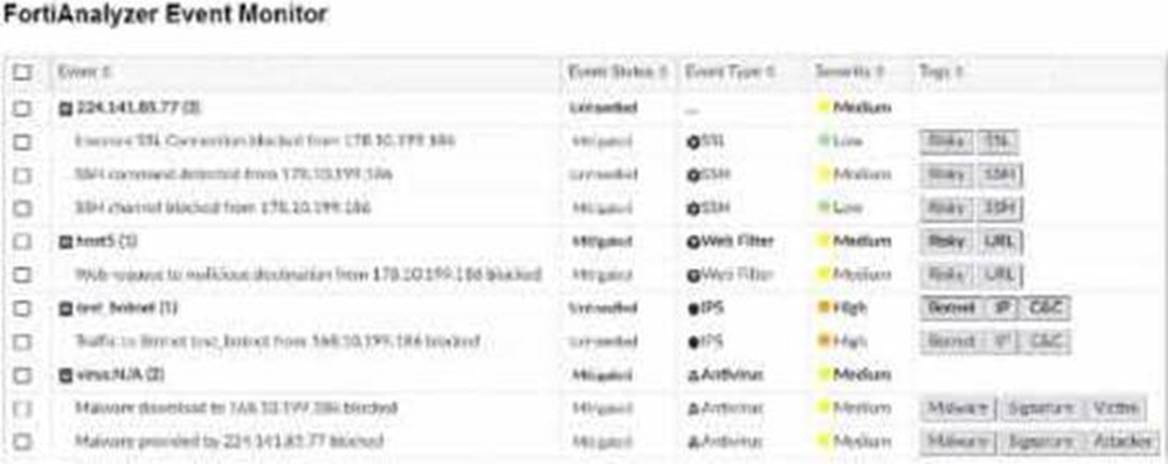
Assume these are all the events that exist on the FortiAnalyzer device.
How many events will be added to the incident created after running this playbook?
Correct Answer:D
In the exhibit, we see a playbook in FortiAnalyzer designed to retrieve events based on specific criteria, create an incident, and attach relevant data to that incident. The "Get Event" task configuration specifies filters to match any of the following conditions:
Severity= High
Event Type= Web Filter
Tag= Malware
Analysis of Events:
In the FortiAnalyzer Event Monitor list:
We need to identify events that meet any one of the specified conditions (since the filter is set to "Match Any Condition").
Events Matching Criteria:
Severity = High:
There are two events with "High" severity, both with the "Event Type" IPS.
Event Type = Web Filter:
There are two events with the "Event Type" Web Filter. One has a "Medium" severity, and the other has a "Low" severity.
Tag = Malware:
There are two events tagged with "Malware," both with the "Event Type" Antivirus and "Medium" severity.
After filtering based on these criteria, there arefour distinct events:
Two from the "Severity = High" filter.
One from the "Event Type = Web Filter" filter.
One from the "Tag = Malware" filter.
Conclusion:
Correct Answer:D. Four events will be added.
This answer matches the conditions set in the playbook filter configuration and the events listed in the Event Monitor.
[References:, FortiAnalyzer 7.4.1 documentation on event filtering, playbook configuration, and incident management criteria., ]
Question 10
Which two statements about playbook execution are true? (Choose two)
Correct Answer:AB
Question 11
Which statement about sending notifications with incident update is true?
Correct Answer:A
In FortiOS and FortiAnalyzer,incident notificationscan be sent to multiple external platforms, not limited to a single method such as email. Fortinet's security fabric and integration capabilities allow notifications to be
sent through various fabric connectors and third-party integrations. This flexibility is designed to ensure that incident updates reach relevant personnel or systems using preferred communication channels, such as email, Syslog, SNMP, or integration with SIEM platforms.
Let??s review each answer option for clarity:
* Option A: You can send notifications to multiple external platforms
* This is correct. Fortinet??s notification system is capable of sending updates to multiple platforms, thanks to its support for fabric connectors and external integrations. This includes options such as email, Syslog, SNMP, and others based on configured connectors.
* Option B: Notifications can be sent only by email
* This is incorrect. Although email is a common method, FortiOS and FortiAnalyzer support multiple notification methods through various connectors, allowing notifications to be directed to different platforms as per the organization??s setup.
* Option C: If you use multiple fabric connectors, all connectors must have the same settings
* This is incorrect. Each fabric connector can have its unique configuration, allowing different connectors to be tailored for specific notification and integration requirements.
* Option D: Notifications can be sent only when an incident is updated or deleted
* This is incorrect. Notifications can be sent upon the creation of incidents, as well as upon updates or deletion, depending on the configuration.
:According to FortiOS and FortiAnalyzer 7.4.1 documentation, notifications for incidents can be configured across various platforms by using multiple connectors, and they are not limited to email alone. This capability is part of the Fortinet Security Fabric, allowing for a broad range of integrations with external systems and platforms for effective incident response.
Question 12
Refer to the exhibit.
Which statement about the displayed event is correct? (Choose one answer))
Correct Answer:C
Comprehensive and Detailed Explanation From Exact Extract of knowledge of FortiAnalyzer 7.6 Study guide documents:
The exhibit shows the eventEvent Status = MitigatedandEvent Type = Web Filter, with the event message indicating the web request wasblocked.
The study guide definesMitigatedevents as follows:"Mitigated: The security risk is mitigated by being blocked or dropped."This means a mitigated status corresponds to enforcement that prevented the risk (block/drop), not a condition where the source is isolated.
It also distinguishesContainedevents from mitigated ones:"Contained: The risk source is isolated."Since the exhibit clearly showsMitigated(not Contained), optionBis incorrect.
Additionally, the study guide notes:??Generally, you can acknowledge mitigated events because the related traffic was blocked by the firewall."This aligns directly with the exhibit's "blocked" wording and supports that the correct interpretation is that the security risk was blocked.
Finally, the event type displayed isWeb Filter, not application control, so optionDis incorrect.
Therefore, the correct statement isC. The security risk was blocked.