Question 7
An Adobe Commerce Developer has written an importer and exporter for a custom entity. The client is using this to modify the exported data and then re-importing the file to batch update the entities.
There is a text attribute, which contains information related to imagery in JSON form, media_gallery. This is not a field that the client wants to change, but the software they are using to edit the exported data seems to be modifying it and not allowing it to import correctly.
How would the developer prevent this?
A) Specify a serializer class for the attribute using the $_transformAttrs class property array for both the exporter and importer so it gets converted:
B) Strip the attribute from the imported file by adding it to the s_strippedAttrs class property array: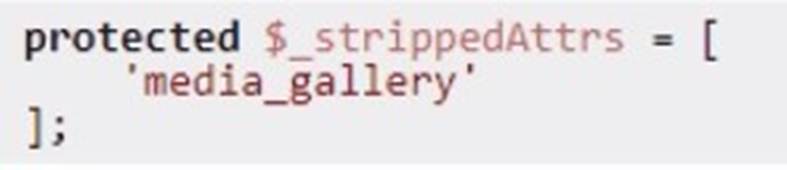
C) Prevent it from being exported by adding it to the $_disat>iedAttrs class property array:
Correct Answer:C
To prevent the media_gallery attribute from being exported as part of the custom entity's data, the developer should add this attribute to the $_disabledAttrs class property array. This effectively excludes the attribute from the export process, ensuring that it does not appear in the exported file and thus will not be modified or re-imported inadvertently.
Option C is correct for the following reasons:
✑ Preventing Export with $_disabledAttrs:Adding media_gallery to the
$_disabledAttrs array tells the system to skip this attribute during export. This prevents the attribute from being included in the export file, thus removing the risk of it being altered by external software that handles the file. Since the attribute will not be present in the exported data, it will remain unchanged in the database when re-importing.
✑ uk.co.certification.simulator.questionpool.PList@6993fe6
: The Adobe Commerce documentation on import/export processes outlines how
$_disabledAttrs can be used to filter out sensitive or unnecessary attributes from export files.
Alternative Options and Their Limitations:
Option A: Using $_transformAttrs with a serializer is useful for encoding or decoding attribute data during export/import, but it does not prevent the attribute from being included in the export. This would only help if the media_gallery data needed transformation, not exclusion.
Option B: $_strippedAttrs is applicable for filtering attributes from the imported file, not the exported file. It would not stop the attribute from being included in the export and hence does not align with the need to prevent modifications during export.
By configuring $_disabledAttrs, the developer effectively ensures the media_gallery attribute remains unmodified by preventing it from being included in export files altogether.
Question 8
Which command can be used to display a full list of enabled and disabled Magento modules?
Correct Answer:B
The command to display a full list of enabled and disabled Magento modules isbin/magento module:status. This command provides a comprehensive overview of all modules within the Magento instance, categorizing them into enabled and disabled modules. This information is crucial for debugging and development purposes, as it allows developers to quickly understand which components of Magento are active and which are not, facilitating troubleshooting and configuration adjustments.
Question 9
An Adobe Commerce developer wants to generate a list of products using ProductRepositorylnterf ace and search for products using a supplier_id filter for data that is stored in a standalone table (i.e., not in an EAV attribute).
Keeping maintainability in mind, how can the developer add the supplier ID to the search?
Correct Answer:B
The developer can add a custom filter to the virtual type Magento\Catalog\Model\Api\SearchCriteria\CollectionProcessor\ProductFilterProce5sor for supplier_id field. In the custom filter, the developer can apply the needed join and filter to the passed $collection. This is the recommended way to extend the search criteria for products using dependency injection and plugins. Verified References: [Magento 2.4 DevDocs] [Magento Stack Exchange]
In Adobe Commerce, when you need to add a custom filter for a non-EAV attribute stored in a standalone table, the most maintainable approach is to create a custom filter for ProductFilterProcessor. This processor allows for customized search criteria handling, which can be extended to include custom joins and filters without altering core functionality or relying on plugins and observers.
✑ Why Custom Filter in ProductFilterProcessor is Preferred:
✑ uk.co.certification.simulator.questionpool.PList@205c9928
✑ Implementation of Custom Filter:
✑ Why Options A and C are Less Suitable:
:
Magento Developer Documentation onUsing Custom Filters in CollectionProcessor Magento DevDocs onDependency Injection and Virtual Types
Question 10
What is the command used to upgrade ECE-Tools on an Adobe Commerce Cloud platform?
Correct Answer:B
To upgrade ece-tools on Adobe Commerce Cloud, the recommended command is to use Composer to ensure that all dependencies are resolved and updated accordingly. The command composer update magento/ece-tools --with-all-dependencies will update ece-tools along with any other dependencies required.
✑ Using Composer for Dependency Management:
✑ uk.co.certification.simulator.questionpool.PList@249e6cc2
✑ Why Option B is Correct:
: Adobe Commerce Cloud documentation onUpgrading ECE Tools
Question 11
An Adobe Commerce Cloud merchant has been experiencing significant downtime during production deployment. They have already checked that the application is in ideal state.
In addition to the configuration of the SCD.MATRIX variable to reduce amount of unnecessary theme files, what would be the next steps to reduce the downtime?
Correct Answer:A
To minimize downtime during deployment, one of the most effective strategies is to configure static content deployment (SCD) to run during the build phase and optimize the number of threads used during the process.
✑ Configuring SCD in the Build Phase:
✑ uk.co.certification.simulator.questionpool.PList@22cc61b1
✑ Increasing SCD.THREADS:
✑ Why Option A is Correct:
:Adobe Commerce Cloud documentation onSCD Configuration
Question 12
A client would like to add an image icon in front of the telephone field to the shipping address form on a checkout page. What is the correct way to modify the Ul component to set a custom template file for the field?
A)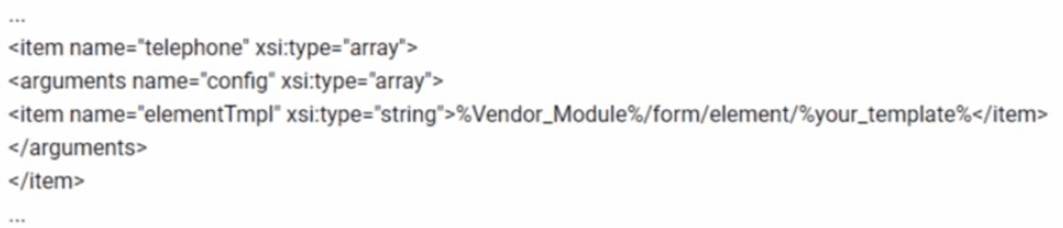
B)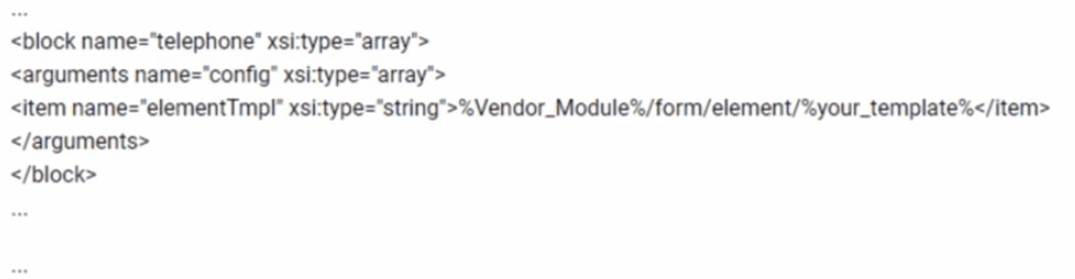
C)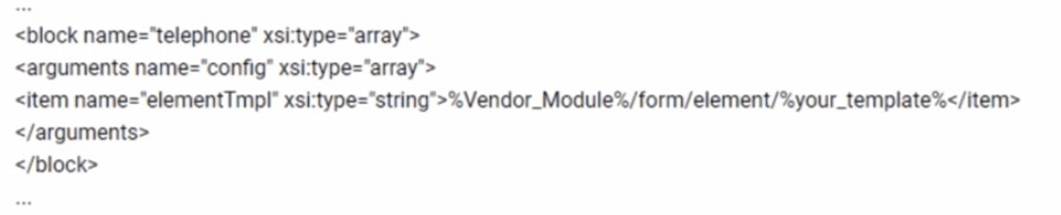
D)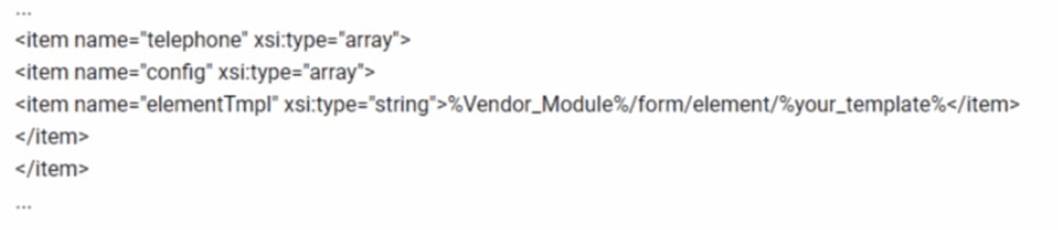
Correct Answer:B
To add an image icon in front of the telephone field in the shipping address form on the checkout page, the correct way is to modify the UI component by setting a custom template file for the field. The snippet in option B is the correct one because it uses the<block>element and sets theelementTmplto the custom template path within the argumentsnode under theconfignode. This modification will instruct Magento to use the specified custom template file for rendering the telephone field, allowing for the addition of an image icon in front of it.