Question 19
An Adobe Commerce developer has created a new shipping carrier Everything has been implemented and the collectRates() and getAllowedMethodsQ functions can be seen below: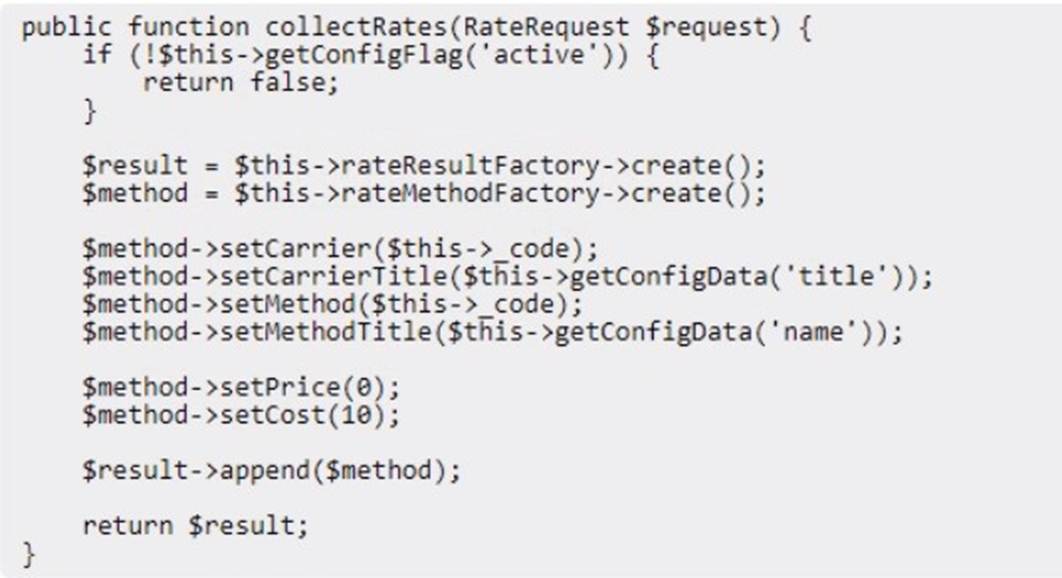

Given the above code, what would be the displayed cost of the shipping method and final amount charged to the customer?
Correct Answer:B
Question 20
Which file on an Adobe Commerce Cloud project allows a developer to upgrade the PHP version and enable/disable a PHP extension?
Correct Answer:B
The.magento.env.yamlfile is used on an Adobe Commerce Cloud project to customize the environment configuration, including the PHP version and enabling/disabling PHP extensions. This YAML configuration file provides the ability to manage service configurations and is essential for customizing the Cloud environment.
Question 21
An Adobe Commerce developer is trying to create a custom table using declarative schema, but is unable to do so.
What are two errors in the snippet above? (Choose two.)
Correct Answer:AC
The correct answers are A and C. The errors in the snippet are:
✑ Column roll_no does not have an index. It is needed since attribute_identity is set to true.
✑ Column student_name does not have an attribute length. Theattribute_identityattribute specifies whether the primary key of the table should be auto- incremented. Ifattribute_identityis set totrue, then theroll_nocolumn must have an index. Thestudent_namecolumn does not have an attribute length, which is required for string columns.
The following code shows how to fix the errors: XML
<table name="vendor_module_table">
<entity_id>
<type>int</type>
<identity>true</identity>
<unsigned>true</unsigned>
<nullable>false</nullable>
</entity_id>
<roll_no>
<type>int</type>
<identity>false</identity>
<unsigned>true</unsigned>
<nullable>false</nullable>
<primary_key>true</primary_key>
<index>true</index>
</roll_no>
<student_name>
<type>string</type>
<length>255</length>
<nullable>false</nullable>
</student_name>
</table>
Once the errors have been fixed, the table can be created successfully.
Question 22
An Adobe Commerce developer is creating a module (Vendor.ModuleName) to be sold on the Marketplace. The new module creates a database table using declarative schema and now the developer needs to make sure the table is removed when the module is disabled.
What must the developer do to accomplish this?
Correct Answer:A
When you disable a module, Magento removes all of its declarative schema changes from the database the next time you run bin/magento setup:upgrade."
This means that when the developer disables the module and runs setup:upgrade, Adobe Commerce will automatically handle the removal of the database table created by the module's declarative schema.
For reference, here are some key points from the documentation:
✑ [Disable a Module](https://x.com/i/grok?text=Disable%20a%20Module)- This section explains how Magento handles the database schema when a module is disabled.
✑ Declarative Schema Configuration- Provides an overview of how declarative
schema works, including its behavior when modules are disabled or uninstalled. Therefore, based on the official Adobe Commerce documentation, the correct action for the
developer is to do nothing further beyond disabling the module and running bin/magento setup:upgrade. Magentowill take care of removing the table associated with the module as part of its schema management process.
Question 23
What are the only writeable folders in the application root on a remote Adobe Commerce Cloud project?
A)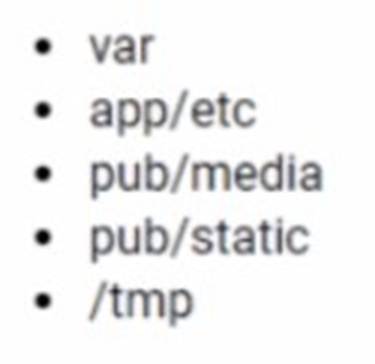
B)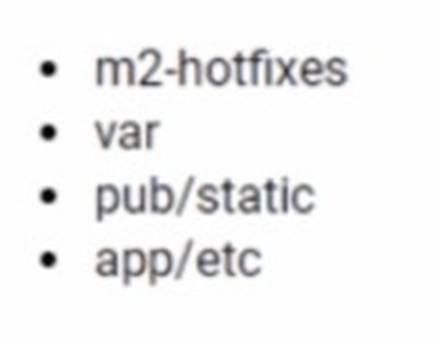
C)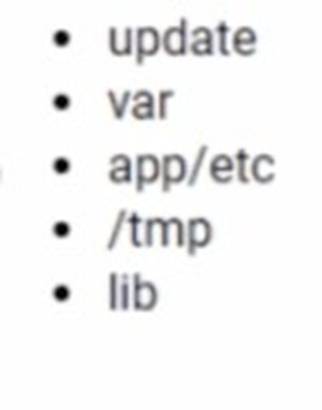
Correct Answer:B
For an Adobe Commerce Cloud project, the only writeable folders in the application root on a remote environment are essential for the application to run correctly and store temporary and dynamic data. Among the options given, Option B lists directories that are typically writable:m2-hotfixes,var,pub/static, andapp/etc. Them2-hotfixes directory is specifically for Magento Commerce Cloud and is used for applying hotfixes that are executed during the build phase. Thevardirectory contains various logs, sessions, and reports. Thepub/staticdirectory holds the compiled static view files, andapp/etccontains configuration files that can be modified by the application at runtime.
Question 24
A developer wants to deploy a new release to the Adobe Commerce Cloud Staging environment, but first they need the latest code from Production.
What would the developer do to update the Staging environment?
Correct Answer:A
The developer can update the Staging environment with the latest code from Production by logging in to the Project Web Interface, choosing the Staging environment, and clicking Sync. This will synchronize the code, data, and media files from Production to Staging, creating an exact copy of Production on Staging. The developer can then deploy the new release to Staging and test it before pushing it to Production. Verified References: [Magento 2.4 DevDocs]