Question 13
A custom theme Is being developed in the Adobe Commerce store, and the developer needs to override the current parent theme styles.
Which less file should the developer use to achieve this goal?
Correct Answer:B
To override the current parent theme styles in a custom theme being developed for Adobe Commerce, the developer should use the_theme.lessfile. This file is specifically designed for customizing and overriding the default styles provided by the parent theme, making option B the correct choice. The_theme.lessfile is a central place for theme-specific customizations.
Question 14
Under which section should the soft dependency for a module be listed in app/code/
Correct Answer:A
Soft dependencies for a module should be listed under the "suggest" section in thecomposer.jsonfile of the module. This section is used to list packages that enhance or work well with the module but are not strictly required for the module to function. By using the "suggest" section, developers can inform others about optional packages that could improve functionality or integration with the module, without making them mandatory dependencies.
Question 15
An Adobe Commerce Cloud developer wants to be sure that, even after transferring database from Production to Staging, the payment configurations are still valid on the Staging environment.
What does the developer need to add to be sure that the configurations are always properly set?
Correct Answer:C
The developer needs to add environment level environment variables to be sure that the payment configurations are always properly set on the Staging environment. Environment variables are configuration settings that affect the behavior of the Adobe Commerce Cloud application and services. Environment variables can be set at the project level or the environment level. Project level variables apply to all environments, while environment level variables override the project level variables for a specific environment. The developer can use environment level variables to customize the payment configurations for the Staging environment without affecting other environments. Verified References: [Magento 2.4 DevDocs]
Question 16
Which theme directory contains the static files that can be loaded directly?
Correct Answer:A
Thewebdirectory contains the static files that can be loaded directly. This directory includes files such as CSS, JavaScript, and images.
In Adobe Commerce themes, thewebdirectory is used to store static files such as CSS, JavaScript, images, and fonts. These files can be loaded directly by the browser. The preprocessedandassetsdirectories do not exist as standard directories in the theme structure for containing directly loadable static files.
Question 17
What does a URL Rewrite do?
Correct Answer:B
A URL Rewrite in Magento changes the way a URL appears in the browser. This is particularly useful for improving the readability and SEO of a URL. For example, a URL rewrite can be used to transform a long and complex URL into a shorter and more user-friendly version. It's important to note that while a URL rewrite changes the URL's appearance in the browser, it doesn't change the actual location of the resource on the server. This distinction is crucial for understanding how Magento handles URL rewrites and redirects, facilitating a more intuitive navigation structure within the store without altering the underlying server resources.
Question 18
An Adobe Commerce developer is tasked to add a file field to a custom form in the administration panel, the field must accept only .PDF files with size less or equal than 2 MB. So far the developer has added the following code within the form component xml file, inside the fieldset node: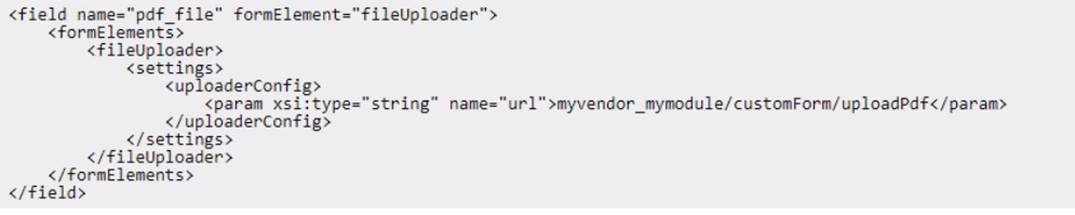
How would the developer implement the validations?
A) Add the Validations Within the HyVendorMyModuleControllerAdminhtmlCustomEntityUploadPdf Controller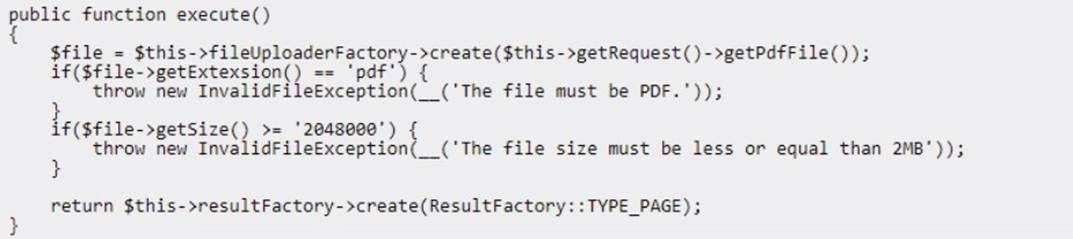
B) Add a virtual type forMyvendorMyModuieModeicustomPdfupioader specifying the aiiowedExtensions and the maxFiiesize for the constructor, within the module's di.xmi:
C) Add the following code inside the
Correct Answer:C
To add file upload validation for a custom form field in the Adobe Commerce admin panel, which should restrict the file type to .pdf and limit the file size to 2 MB, the recommended approach is to include the validation parameters directly within the
<settings> node in the form??sXML configuration. This ensures that the validation occurs on the client-side as well as server-side, providing immediate feedback to users before submission.
Option C is correct for the following reasons:
✑ Adding Validation Inside <settings>:By placing the <allowedExtensions> and
<maxFileSize> tags within the <settings> node of the XML configuration, the system will enforce these restrictions directly within the form component. This method leverages Magento??s built-in support for validation settings, which ensures that only files matching the specified criteria (.pdf files of 2 MB or smaller) are accepted by the form.
✑ uk.co.certification.simulator.questionpool.PList@78475b0d
: Magento??s documentation on UI components highlights how to enforce file type and size restrictions through XML configurations within <settings>, making it the standard and most efficient solution for this task.
Alternatives and Limitations:
Option A: Adding validation within the controller (UploadPdf) can provide additional server- side validation, but this does not prevent the user from selecting invalid files in the first place. Server-side validation alone lacks the user experience enhancement provided by client-side feedback.
Option B: Configuring a virtual type in di.xml for validation (e.g., setting allowedExtensions and maxFileSize within a custom uploader model) is effective for backend processing but is
not as straightforward for direct form validation within the admin UI. It complicates the implementation by requiring custom backend logic where native XML validation can suffice.
Option C provides a straightforward, maintainable, and user-friendly way to implement file validation directly in the form configuration. It reduces the need for custom controller or model logic and leverages Magento??s built-in form handling capabilities.